All downloads For macOS

WebFones Voice for Mac

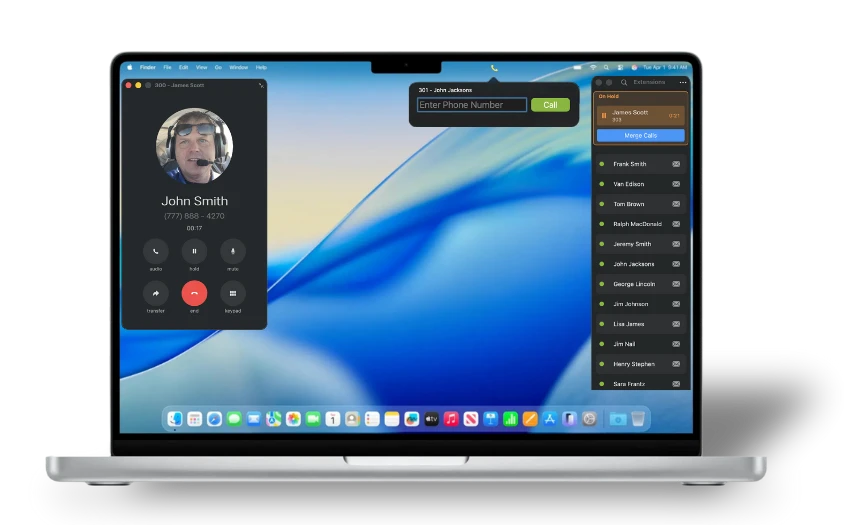
A full-featured desk experience for your Mac — calls, messaging, transfers, merge calls, and extension presence all in one window. Built for Apple Silicon.

~5 MB Updated June 10, 2026 macOS 11.0 (Big Sur) or later Apple Silicon
WebFones Voice for Mac — active call window with contact details and extension presence
Call Intelligence

See what was said. Score how it went.

Call Intelligence is right inside the Mac app. AI summaries, performance ratings, and full transcripts for every call your team handles — no separate dashboard, no waiting on email reports.

Spot follow-up gaps the moment they happen. Coach with specifics, not impressions.

WebFones Call Intelligence inside the Mac app showing AI-generated purpose, response, and conversation summary for an inbound call
Messaging

Templates that save your team from typing the same thing twice.

Save common replies, follow-ups, appointment confirmations, and after-hours messages as templates. Pick from the dropdown, customize if needed, and send in two clicks.

Built into the same chat window your team is already using — no separate app, no copy-paste juggling.

WebFones Voice for Mac messaging templates window with a template selected and ready to send
Visual Voicemail

Voicemail you can read.

Every voicemail arrives with an AI-generated summary up top, the full transcript below, and the audio still one tap away. Triage what needs a callback in seconds — without listening to a single recording.

See the caller, the extension dialed, and a clear next action at a glance. No more replaying messages just to remember who said what.

WebFones Voice for Mac voicemail window showing AI summary at the top, full transcript below, and audio playback controls

System Requirements

  • macOS 11.0 (Big Sur) or later
  • Apple Silicon Mac
  • An active WebFones Voice user account
  • Broadband internet connection
  • Microphone & speakers (or headset)

Install in 3 steps

  1. 1Click Download for Mac above
  2. 2Open the .dmg and drag WebFones Voice into Applications
  3. 3Launch and sign in with your WebFones credentials

Looking for another device?

WebFones Voice runs on iOS, Android, and Windows (soon) too.

See all downloads